
I originally wrote this simple application because a friend wanted a convenient way to delete ASO files and I was looking to learn how a system tray icon application can be built with .Net. After getting the initial version, I added a few more options and have been personally using it ever since.
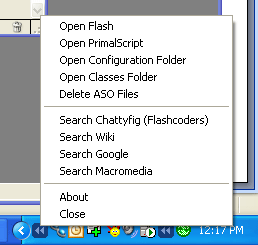
Currently it can:
- Delete ASO file
- Open personal configuration folder
- Open personal classes folder
- Open PrimalScript if installed
- Open Flash MX 2004
- Search Flashcoders
- Search Flashcoders Wiki
- Search Google
- Search macromedia
To install, copy the exe file to your startup folder. That way it will always run on startup. If you find any bugs or have feature requests feel free to let me know. I’m not sure how much more I will develop this small tools at this point, or if people will even find this useful, but I do have some ideas that I would like to add if I have the time.
(Current Version .2)
Download: here
Requires: .Net 1.1 runtime
Sweet stuff
very nice – thanks…. 1 thing though – it would be nice if “open primalscript” could be customized (to open my favourite editor)…
Karim: Pretty sure someone was gonna ask for that. I’ll put that on the list
Thanx for this nice tool !
Chafic, very cool – suggestion from a Central developer: how about an equivelent for the Central folder to grab swf for final publishing (C:\Documents and Settings\USERNAME\Application Data\Macromedia\Central) and the path to the Flash Player to blow away SOL files (C:\Documents and Settings\USERNAME\Application Data\Macromedia\Flash Player)
very sweet. how about something like this with a contextual menu… that sits in a osx dock?
Andrew: Added to the list
Eric: This should be pretty easy using AppleScript from what I recall. It won’t show up in your dock but will show up at the top next to the time/wireless status/etc.
Really nice! I’m lovin’ it!
One request: Would it be possible to add a bit more granularity to the ‘Delete ASO files’ feature? ie, give it a namespace (package path), or even a specific class to expunge? This way, it could still capitalize on the pre-compilation of classes that haven’t been changed or edited, and the flexibility to remove the specific classes/packages that need to be recompiled.
Thanks Chafic you rule!
I originally wrote this simple application because a friend wanted a convenient way to delete ASO files
Hey that friend was me! You da man!
Thanks again, this will save me so much frustration. Just need to add a hotkey for delete aso in v2 =)
cheers
Jer
Nice tool A few suggestions if you dont mind. Actually one, could you make it read from an XML file, that way i could add programs i want it to launch, folders to open, or search new sites…. since you have it working i dubt it would take much time to add this….
lemme know if ud like me to help
thanks,
nik
Doesnt install:
The dynamic link library mscoree.dll could not be found in the specified path
:/
whats wrong?
Francisco: This sounds like you don’t have .Net 1.1 installed on your system.
i have made one flash files with 20 scenes in it, swf works smooth and size of swf file is almost 600k and fla files size is 15 mb. This file works too slow. as i need to do some changes in it it take lot of time, just on a click, it takes 5 to 10 minutes……. y is it soo can any one give me suggestion……. (my machine is p III 800, 256 mb ram, 30 gb hdd)
it’s cool !!!!!!!
Great little tool, downloaded mainly because of your delete aso feature. One thing i noticed though and thats you can start more than one instance of the app running at the same time in your tool bar.
Great little tool, downloaded mainly because of your delete aso feature. One thing i noticed though and thats you can start more than one instance of the app running at the same time in your tool bar.
Not sure how I missed this the first time around. Sweet package of tools there.
Nice litle tool!
One suggestion though:
Do not use hardwired paths for the programs path and the aso path, but use the environment variables for that.
On my German W2k the tool does not find Flash Resource Manager unless I edit the config file, as my FRM resides in
F:\Programme\Flash Resource Manager\
instead of
C:\program files\Flash Resource Manager\
It also does not delete the ASO files for the same reason. Here I not even have the possibility to edit the path in config.
Joerg: Yeah the config file is used to set the paths to Flash Resource Manager and some other small options (Flash resource manager does not set any registry entries or environmental variables for its path, so that is the only way to retrieve the path).
I haven’t heard anyone have issues with the ASO path. It currently checks for the paths, including language of the folder using several registry entries. I know it has been tested on more than one language OS so maybe there is something specific about German W2k OS? Feel free to email me directly the path to your ASO files and I’ll look into it
Great. Email goes out in a minute.
Concerning the program path to Flash Resource Manager I thought of the possibility to use environment vars within the config file. Something like:
…Something like:
<add key=”FlashResourceManagerPath” value=”%ProgramFiles%\Flash Resource Manager”/>